Every noteworthy change to the product, newest first. Rehnable ships
continuously — but this page only ever describes what is live right now. If you can
read it here, you can do it in your portal today.
Each entry is dated by the day the change went live in production, not the day this
text was written — so an entry added later still carries the date the change actually
reached your portal.
You can now install Rehnable straight from its listing on the HubSpot
App Marketplace. A Super Admin clicks Install, approves the permissions, and the
chart is one button away on every company record.
Cards that name what they show, and deal coverage you can take at its word
Every value on a card says which field it came from
A date on a card is only worth having if you know which date it is. Every date,
number and yes/no property on a card now carries its field name inline beside the
value, in the wording your own portal uses — so three date fields read as three
named dates instead of three anonymous ones. A long field name shortens to fit
rather than pushing the value off the card; hover the row on a person's card and
you get the name and the value in full. Company cards name their fields the same
way, for the same reason.
The heat is now written as well as painted. Beside the coloured stripe, every card
states the value behind it — days since anyone contacted the person, or how many
deals they are on, following whichever mode the chart is showing. The colour has
become a second reading of a fact you can already see, so nobody has to interpret
a shade to work with the chart.
Deal coverage answers even when the answer is "nobody here"
Pick an open deal and everyone on it who is on the chart is ringed, while the rest
of the chart steps back. Stepping back is now done to the card itself — the
background washes towards the canvas and the border fades — and never to the
writing on it, so every word on a stepped-back card stays at full strength and the
whole chart is still readable while one deal is in focus.
And when the deal has nobody to ring, you are told so in a sentence instead of
being left with a faded chart and no marks: a deal whose linked people are all off
this chart says exactly that, and a deal with no contacts linked to it says that
instead — two different facts, never phrased as one. The figures in the panel and
the marks on the chart belong together, too: each figure says what it is counting,
whether that is the people on this company or the people the deal is linked to.
When someone linked to the deal carries no mark, the panel accounts for them in
words, with the reason — not placed on the chart at all, or
hidden inside a collapsed branch above them. Folding a branch in changes what
you can see, not the figure for how much of this company the deal reaches. And a
row's "Show on chart" is only offered for someone the chart can actually show.
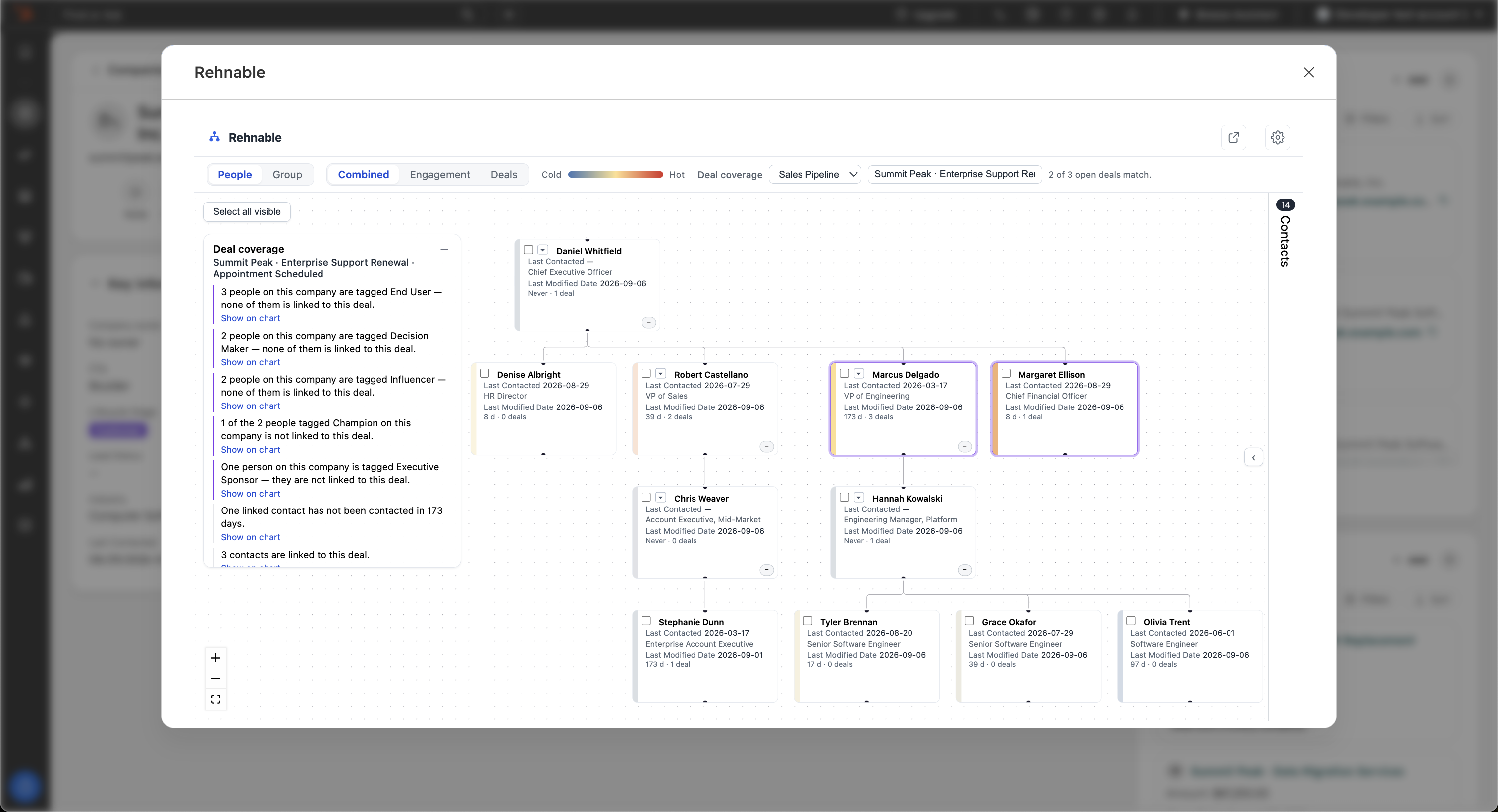
One deal in focus: two of the three people linked to it are on this chart and
ringed, the panel accounts for the rest in sentences, and every card carries its
field names and the heat in words.
Find the deal by typing its name
The deal picker filters as you type: start typing part of a deal's name and the
list narrows to what matches. It is a proper keyboard control — arrow keys move
through the list, Enter chooses, Escape closes — and it announces itself to screen
readers as the combobox it is, so choosing a deal never requires the mouse. A
pipeline chooser appears beside it only where the open deals in front of you
genuinely span more than one pipeline — where they all sit in one, there is
nothing to choose between and nothing is put in your way.
Filtering is never silent. While a filter is active the picker states how many of
how many open deals match, so a filtered list is never mistaken for the whole list,
and the deal you have already chosen stays in the list even when your query
excludes it — with a line saying so. When nothing matches, the list says "No deals
match" rather than claiming you have no open deals.
The engagement heat map now measures contact you actually made
Warm means someone reached them — not that they visited your website
The engagement half of the heat map used to colour a stakeholder by HubSpot's
"Last Engagement Date", which records what the prospect does towards you: a page
visit, a form, an opened tracked email. It now reads "Last Contacted" — the date
HubSpot maintains from outreach your side actually logs: calls, meetings, sales
emails, chats, LinkedIn and SMS messages, postal mail. On companies and on people
alike, the colour on a card now answers the question an account map exists to
answer: has anybody here really been in touch with this person?
Expect some cards to turn grey, and read the grey as information. Someone nobody
has ever contacted is no longer warmed up by a stray visit to your site — they
show as "Never contacted", which is precisely the hole in your coverage worth
finding before the deal closes without them. Nothing else about the scale moved:
recency still fades from hot to cold over four months, and never-contacted stays
its own state rather than being flattened into a zero.
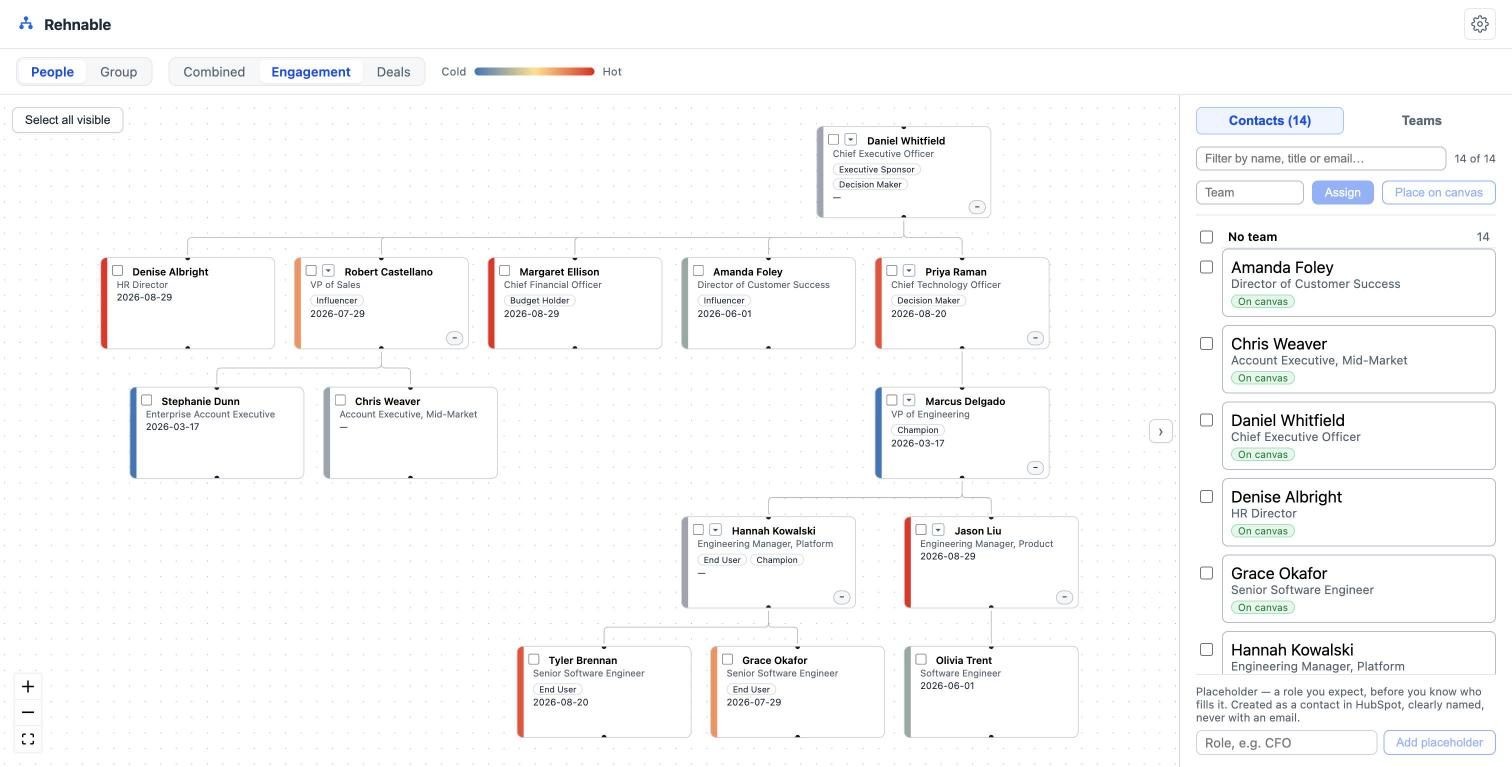
Engagement heat across a fourteen-person organisation: red where contact is
days old, blue where it is months old, grey where there has been none.
Group summaries add up only what is genuinely a quantity
A field can be a number and still be no amount. Record identifiers, coordinates and
points in time stored as numbers are no longer offered on the sum side of the panel
— now called Group summary rather than Group totals, since it no longer only adds
things up but also breaks them down — because a total of record IDs or of longitudes
is a convincing-looking figure that means nothing at all. The rule reads the field's name rather than a list
we maintain, so your own office_latitude or erp_sync_timestamp
falls away too, without us having seen your portal. It reads names that spell the
word out; short forms like lat and lon are deliberately left
alone, because they also name real quantities — lön is Swedish for salary,
and refusing to sum a salary column would be the worse mistake. Counting companies
per value is untouched — those fields can still be summarised that way, and every
real quantity your portal holds is still summed as before.
The group view can now sum any numeric company field across an entire corporate
group — annual revenue, employee counts, or a calculated property your portal
already maintains — computed live from your CRM at every viewing and never stored
on our side. And the totals are built to be trusted: each one shows how many of
the companies actually carry a value, the view says so when the group is larger
than what is drawn, and when amounts are in different currencies Rehnable holds
the total back rather than add them together — a sum you cannot rely on is worse
than no sum. Category fields get the same treatment as counts per value: pick the
company owner and see how the group is split across your team, or pick your own
dropdown field and see how many subsidiaries run which ERP — the right kind of
summary follows from the kind of field, automatically. The relationships you have
defined between companies in HubSpot — supplier, reseller, or whatever taxonomy
you have built — now appear as labels on the group chart, read straight from your
portal and shown exactly as you named them. Company cards can carry the properties
you choose, a property can be changed across many companies at once, and a company
placed at the top of a group by mistake can be removed from it again, with undo.
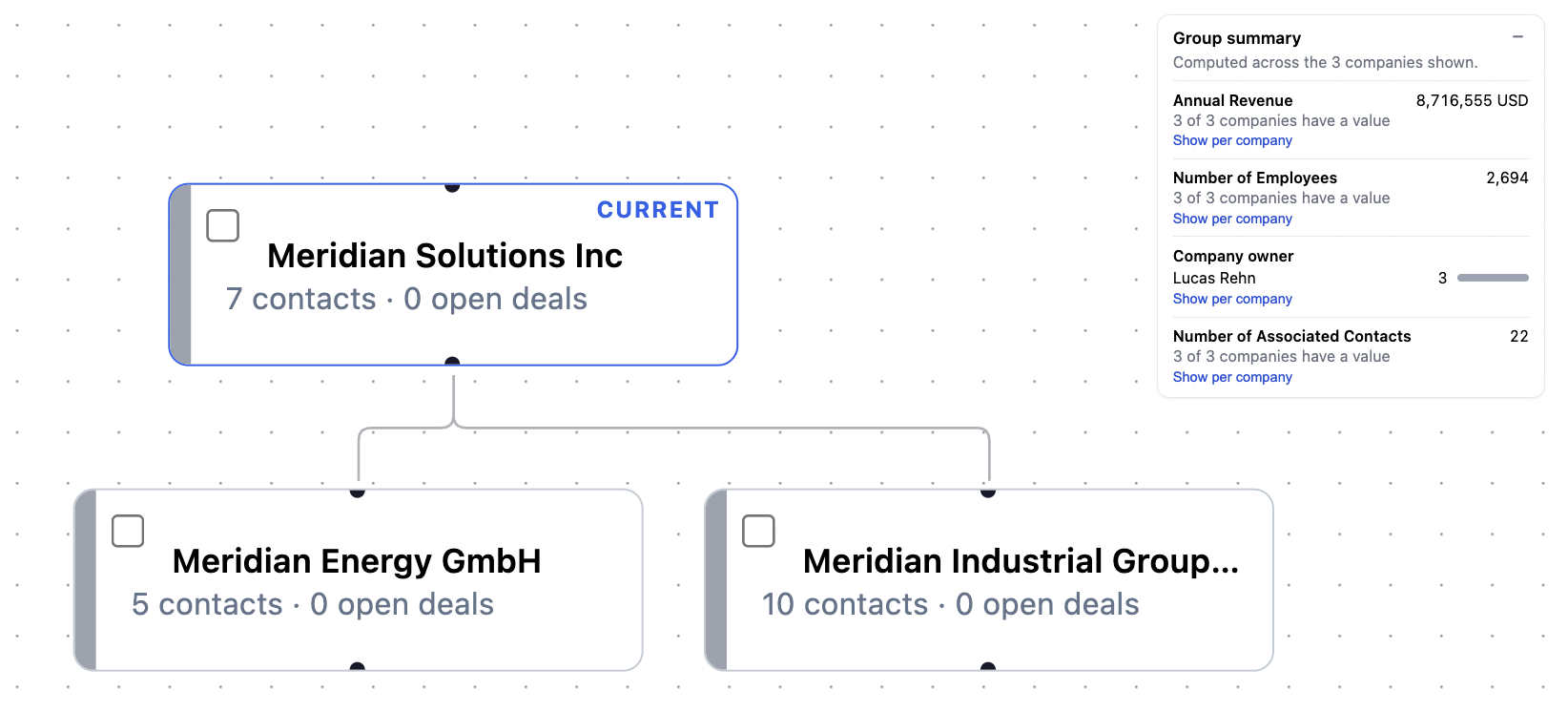
The Group summary panel over a three-company group: sums for the number fields,
a per-owner count for the owner field.
Room to work on large organisations
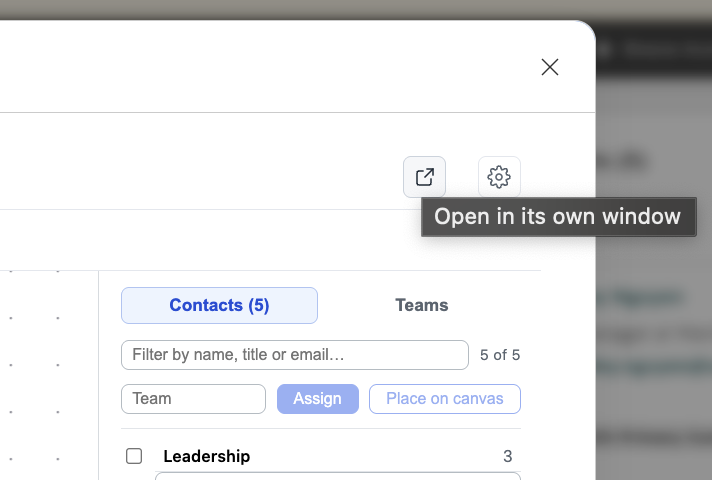
The editor can now open in a full browser tab of its own instead of the modal on
the record — made for organisations that outgrow the box. You can also zoom out
far enough to take in an entire large organisation at once, and when the cards
become too small to hit with confidence, drag-and-drop switches itself off: reading
the chart is safe at any distance, while rewiring a reporting line requires being
close enough to mean it.
One click next to the settings gear takes the whole editor out of the modal.
Chart the role before you know the name
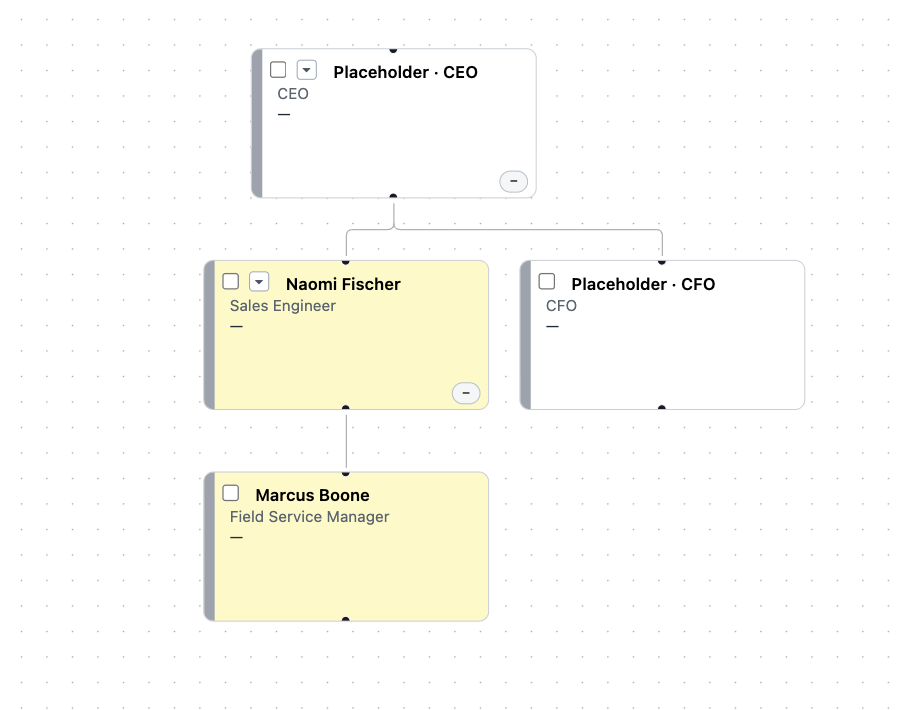
An org chart is sometimes about the position, not yet the person. You can now add
a placeholder for a role no contact fills — the head of procurement you have not
met, the decision-maker you know must exist — place it in the hierarchy, and turn
it into the real person once you learn who that is.
Placeholder roles hold their place in the hierarchy until you know who fills them.
A name of its own, an address of its own, and plans you can buy yourself
Rehnable, served from app.rehnable.com
The product carries one name now, on every surface you can see: the app in your
HubSpot install list, the card on the record, the editor itself, the address we
answer support from. The editor and the card also load from a permanent address
of their own, app.rehnable.com — the one to hand your IT team
if outbound domains need approving. The previous address kept working throughout
the move, so no portal lost its card while the change rolled out, and none of this
asks anything of you: an install made before the rename simply answers to the new
name.
See the plans, and manage the subscription, without an email thread
The editor's settings now hold a Plans panel: the packages, what each includes and
what it costs, read live from our billing system rather than typed into the app — so
what you see in the panel is what a checkout will actually charge. A checkout opens
in its own tab, and a HubSpot super admin — only a super admin — gets a Manage
subscription button that opens the billing portal where the card, the invoices and
the cancellation live.
Rehnable is free until 22 October 2026, and the editor says so in the canvas rather
than leaving you to guess; the panel is live today so that what happens after the
free-access window is never a mystery, and buying or leaving never requires talking
to us.
Chart a whole corporate group, not just one company
Parent and subsidiaries on one canvas
Some accounts are not a company but a family of them, and the org chart of any
single subsidiary tells you less than the shape of the group. The editor can now
switch from people to companies and lay out a parent with its subsidiaries, so an
account team can see the structure it is actually selling into.
Rearranging that structure writes back to your CRM, not to a picture of it. Drag a
company under a different parent and the relationship is recorded on the companies
themselves as an ordinary HubSpot association — the same one you would have made by
hand on the record, visible to everyone in the portal whether or not they ever open
Rehnable. A company cannot end up under two parents, and it cannot be made its own
ancestor; both are refused before anything is written.
Bring in a company that is not linked yet
Most groups do not exist in the CRM before somebody builds them, so starting from
an empty parent is the normal case rather than the exception. Search for a company
by name and place it on the canvas, then attach it where it belongs. Placing it is
just a placement — nothing is written to your portal until you actually connect it
to the group.
Turn a selection into work: a list, or a task each
Save the people you picked as a HubSpot list
An org chart is often where you work out who matters, and the answer is worth
keeping. Tick the contacts you care about and save them as a static list in your
portal, named by you — a real HubSpot list, usable in a sequence or a workflow like
any other, and not a saved view that only exists inside our app.
Or give each of them a task
The same selection can become one task per contact, all sharing the title, due
date, owner and notes you fill in once. It is the step that usually turns a
stakeholder map into actual outreach: you have just worked out that four people
have gone quiet, and this is how the follow-up gets onto somebody's list before
the tab closes.
The chart is built from the contacts already on the record
Rehnable runs inside HubSpot from a card on the company record: one button, and the
contacts associated with that company appear as a chart, each card carrying the
person's name, job title and buying role. Nothing is imported and nothing is typed
twice — the chart is a reading of the contacts you already have.
Drag one card onto another and the reporting line is written back to your portal as
a labelled contact-to-contact association. That matters more than it sounds: the
structure lives on the contact records, where your colleagues and your workflows
can see it, instead of inside a drawing that only means something to whoever made
it. A reporting line that would create a loop is refused before it is written.
Two signals over the same tree, and both at once
The chart can be shaded by either of two signals — how engaged a contact is, or how
much open business they are attached to — and by both combined, which is the view
it opens on. Each is scored relative to the company on screen rather than against
your whole database, so the colours answer "who stands out here" rather than "who
is busy somewhere in the CRM".
Teams, in colour
Contacts can be tagged with the function they belong to — procurement, IT, finance,
whatever your deals actually run through — and each team carries its own colour on
the cards, so a committee reads as departments at a glance instead of a wall of
identical boxes. Tagging works on a whole selection at once, and the tag is stored
as a contact property in your own portal.
See it against your own portal
Install it from the HubSpot App Marketplace listing: every portal gets the full product
and a direct line to the person who built it.